Memory infrastructure for AI agents.
A cognitive memory system that encodes, consolidates, decays, and retrieves — just like the human brain.*

A cognitive memory system that encodes, consolidates, decays, and retrieves — just like the human brain.*

GGeett  ssttaarrtteedd  ffoorr  ffrreeee
RReeaadd  tthhee  ddooccss

*Persistent, hierarchical memory that learns from every interaction. Not a knowledge base. Not a vector store.

*Persistent, hierarchical memory that learns from every interaction. Not a knowledge base. Not a vector store.

Sub-200ms

retrieval latency

3-scope hierarchy

Merchant, Visitor, Conversation

The Problem

Agents forget. Every time.

Most agents are stateless by design. Each session starts from zero. LLMs don't retain context between calls. RAG retrieves documents — it doesn't remember users.

No session continuity

Every conversation starts cold. The agent has no idea what was discussed last time.

RAG isn't memory

Retrieval over documents answers factual questions. It doesn't track what a user said last week.

Memory management is undefined

No framework for what to retain, what to update, or when memory stops being relevant.

Home-built systems break at scale

Conversation history in a list works for demos. It fails at thousands of users.

The Solution

A dedicated layer for what agents need to remember.

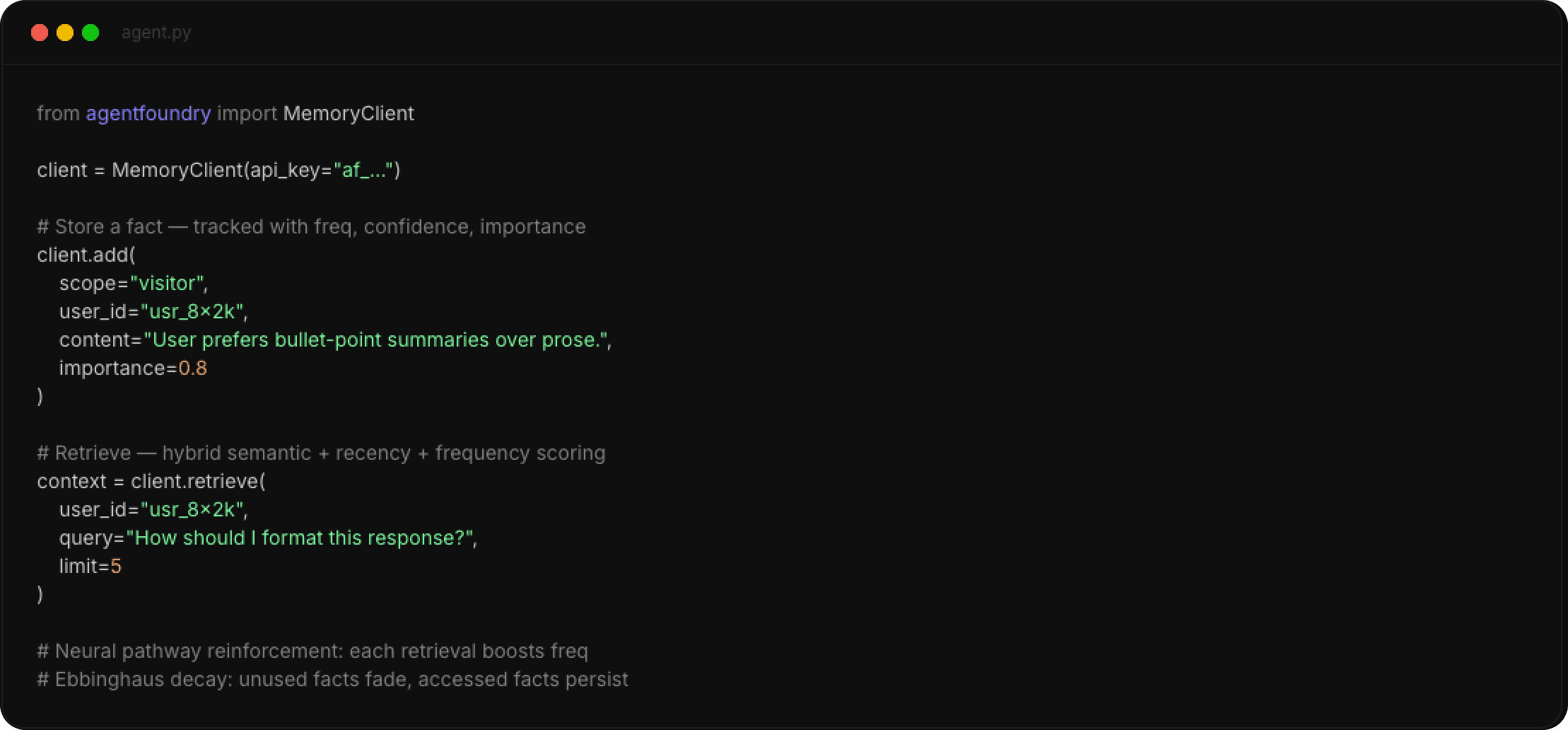
agents-memory handles memory storage, retrieval, and lifecycle — so you don't have to build it yourself. It sits between your agent and your LLM, storing what happened, who said it, and what matters.
It's not a database you query manually. It's memory that works automatically: collected, intelligently retrieved, and scoped to the right user.

01

Conversation scope

Redis STM — active session context, last N turns, auto-TTL

02

Visitor scope

Episodic memory — personal profile consolidated across conversations

03

Merchant scope

Shared knowledge base accessible to all agents in your tenant

04

Retrieval engine

Hybrid semantic + recency + frequency scoring — ranked and ready to inject

How It Works

Three steps. No plumbing.

01 • Capture

Your agent sends interactions to AgentFoundry via API — messages, events, extracted facts. Stored across three scopes: Merchant (shared KB), Visitor (personal profile), and Conversation (session context).

02 • Retrieve

Before each LLM call, query AgentFoundry. Get back ranked context via hybrid semantic + recency + frequency scoring. Contradiction detection flags stale facts automatically.

03 • Evolve

Each retrieval reinforces neural pathways — frequently accessed memories resist forgetting. Unused facts decay along the Ebbinghaus curve. The agent grows sharper over time.


<< agents memory >>

Pricing

Get started with our simple pricing

Starter

Get started with free account and upgrade when ready

$0

Track time on 1 personal project

Basic project management tools

Personal dashboard and reports

Manual time entry

Basic notifications/reminders

Community support

Get started

MOST POPULAR

Team

Get started with free account and upgrade when ready

$49

Everything in Starter

Manage and assign projects in teams

Team time tracking and reporting

Automatic time tracking

Custom notifications/reminders

E-mail support

Upgrade now

Enterprise

Ultimate set of software features and security

Custom pricing

Everything in Team

Advanced team and project analytics

Unlimited users

Single Sign-On (SSO) integration

Dedicated account manager

Custom integrations/API access

Contact sales

Starter

Get started with free account and upgrade when ready

$0

Track time on 1 personal project

Basic project management tools

Personal dashboard and reports

Manual time entry

Basic notifications/reminders

Community support

Get started

MOST POPULAR

Team

Get started with free account and upgrade when ready

$49

Everything in Starter

Manage and assign projects in teams

Team time tracking and reporting

Automatic time tracking

Custom notifications/reminders

E-mail support

Upgrade now

Enterprise

Ultimate set of software features and security

Custom pricing

Everything in Team

Advanced team and project analytics

Unlimited users

Single Sign-On (SSO) integration

Dedicated account manager

Custom integrations/API access

Contact sales

Starter

Get started with free account and upgrade when ready

$0

Track time on 1 personal project

Basic project management tools

Personal dashboard and reports

Manual time entry

Basic notifications/reminders

Community support

Get started

MOST POPULAR

Team

Get started with free account and upgrade when ready

$49

Everything in Starter

Manage and assign projects in teams

Team time tracking and reporting

Automatic time tracking

Custom notifications/reminders

E-mail support

Upgrade now

Enterprise

Ultimate set of software features and security

Custom pricing

Everything in Team

Advanced team and project analytics

Unlimited users

Single Sign-On (SSO) integration

Dedicated account manager

Custom integrations/API access

Contact sales

Want to learn more? Review our frequently asked questions or contact sales team

Want to learn more? Review our frequently asked questions or contact sales team

Blog

Get the latest from our dev team

Testimonials

Early Bird Users Love Us

Charlie Mack

@charlie31

This software is packed with intuitive tools that make designing posters, social media content, and logos super fun. The drag-and-drop interface is slick, and the templates are modern and on-trend. Total game-changer for freelancers like me!

Jenn Yang

@jenny67

Lowkey impressed with how polished this update is. Great work! 💼✨

Tom Wern

@wernnnn110

Just updated the app and WOW—smooth, fast, and looks 🔥🔥🔥

Jerrey Grenson

@charlie31

It's symbol and style system is incredibly useful for UI kits and component-based design. It’s lightweight and easy to run even on older MacBooks. That said, its lack of native Windows support is a big limitation for cross-platform teams. 

Linda Sunny

@lindasunny

The redesigned interface? Chef’s kiss. UX is on point now 👌

Will Beck

@beck33

Cerry Bloom

@cerry791

Performance boost is REAL. App runs like butter now 🧈

Jake Linner

@jakelin833

Not gonna lie, this update made me fall in love with the app all over again ❤️

Ben Turner

@turnerben3

Update dropped and suddenly I’m using this app 3x more. Addicted. 👀

Lindsy Crammer

@mmer87

Completely revolutionized how my design team works. The cloud-based setup means no more emailing files back and forth—we can all work on the same project simultaneously. Features like auto-layout, prototyping, and version control make it ideal for UX/UI design. Plus, the developer handoff is seamless, saving tons of time during implementation. Whether you're a solo designer or on a big product team, Figma is basically essential now.

Charlie Mack

@charlie31

This software is packed with intuitive tools that make designing posters, social media content, and logos super fun. The drag-and-drop interface is slick, and the templates are modern and on-trend. Total game-changer for freelancers like me!

+300 Users Love FocusHQ

Show more

Charlie Mack

@charlie31

This software is packed with intuitive tools that make designing posters, social media content, and logos super fun. The drag-and-drop interface is slick, and the templates are modern and on-trend. Total game-changer for freelancers like me!

Jenn Yang

@jenny67

Lowkey impressed with how polished this update is. Great work! 💼✨

Tom Wern

@wernnnn110

Just updated the app and WOW—smooth, fast, and looks 🔥🔥🔥

Jerrey Grenson

@charlie31

It's symbol and style system is incredibly useful for UI kits and component-based design. It’s lightweight and easy to run even on older MacBooks. That said, its lack of native Windows support is a big limitation for cross-platform teams. 

Linda Sunny

@lindasunny

The redesigned interface? Chef’s kiss. UX is on point now 👌

Will Beck

@beck33

Cerry Bloom

@cerry791

Performance boost is REAL. App runs like butter now 🧈

Jake Linner

@jakelin833

Not gonna lie, this update made me fall in love with the app all over again ❤️

Ben Turner

@turnerben3

Update dropped and suddenly I’m using this app 3x more. Addicted. 👀

Lindsy Crammer

@mmer87

Completely revolutionized how my design team works. The cloud-based setup means no more emailing files back and forth—we can all work on the same project simultaneously. Features like auto-layout, prototyping, and version control make it ideal for UX/UI design. Plus, the developer handoff is seamless, saving tons of time during implementation. Whether you're a solo designer or on a big product team, Figma is basically essential now.

Charlie Mack

@charlie31

This software is packed with intuitive tools that make designing posters, social media content, and logos super fun. The drag-and-drop interface is slick, and the templates are modern and on-trend. Total game-changer for freelancers like me!

Show more

FAQ

Frequently Asked Questions

Will I need to re-download the app after early access ends?

Nope! You’ll get a regular update when the official version is released. Your data and settings will carry over.

What should I expect from the early version?

The app is still under development, so you may encounter bugs or unfinished features. Your input helps shape the final version.

Is the early access version free?

Yes, early access is completely free. All we ask is for your feedback to help us improve.

How can I join early access?

You can sign up through our website or app landing page. Spaces are limited, so it’s first come, first served!

What is early access to the app?

Early access lets users try a preview version of the app before the official launch. It helps us test features, gather feedback, and make improvements.

Create a free website with Framer, the website builder loved by startups, designers and agencies.